BTemplates.com

Powered by Blogger.

Pageviews past week

Quantum mechanics

Auto News

artificial intelligence

About Me

Recommend us on Google!

Information Technology

Popular Posts

Showing posts with label software. Show all posts

Wednesday, July 3, 2013

Microsoft creates mood sensing software for smartphones


Microsoft Research Asia has been working on creating software called MoodScope that notes how a user uses his or her phone, and then uses that information to guess that user's mood. Initial testing of the device has shown it to be 66 percent accurate; when tailored to an individual user, the team reports that the accuracy rate jumped to 93 percent. The research team includes Nicholas Lane and Robert LiKamWa of Rice University, and Lin Zhong and Yunxin Liu from Microsoft Research Asia. They built a prototype and posted their test study results on Microsoft's website.
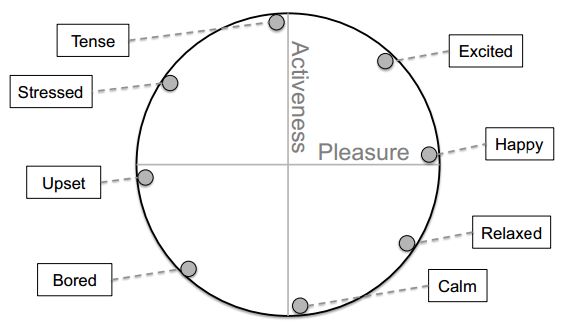
The circumplex mood model.
The circumplex mood model. Credit: Robert LiKamWa et al.

Most people realize that their smartphone has a lot of embedded technology in it that interacts with the world at large—GPS hardware, accelerometers, etc. all monitor activity and use that data to provide useful functions, such as automatically switching from landscape to portrait mode when a phone is rotated. In this new effort, the researchers sought to discover whether software that monitors phone activities could reveal the users' moods.

To find out, the team wrote code that monitored email, texting, app usage, phone calls, location information, and browsing history, then added algorithms to guess mood based on that data. Next, they enlisted the assistance of 32 volunteers to help them test the accuracy of their code. The volunteers were asked to use the system for two months while also completing mood assessments to provide data for comparison. With no training or tweaking, the software was found to provide answers of happy, tense, calm, upset, excited, stressed, or bored that matched the actual mood reported by the volunteers, on average 66 percent of the time. After optimizing the system for the individual habits of each of the volunteers, the rate increased to 93 percent.

The researchers suggest third party hooks could be added to the software to allow for automatically transmitting user moods to applications like Facebook. They also acknowledge that privacy concerns could arise if the software were to be delivered to the public, but suggest the benefits of such software would likely outweigh such concerns. They note that sites like Netflix or Spotify could use data from MoodScope to offer movies or other content based on specific users' moods.


The team presented their findings at MobiSys 2013 held in Taiwan last month.


More information: MoodScope Building a Mood Sensor from Smartphone Usage Patterns: research.microsoft.com/apps/pubs/default.aspx?id=194498
 

Research paper: www.ruf.rice.edu/~mobile/publications/likamwa2013mobisys2.pdf

Monday, July 23, 2012

'Minority Report' software hits the real world


The software behind the film "Minority Report" -- where Tom Cruise speeds through video on a large screen using only hand gestures -- is making its way into the real world.


The interface developed by scientist John Underkoffler has been commercialized by the Los Angeles firm Oblong Industries as a way to sift through massive amounts of video and other data.

And yes, the software can be used by law enforcement and intelligence services. But no, it is not the "pre-crime" detection program illustrated in the 2002 Steven Spielberg sci-fi film.

Kwin Kramer, chief executive of Oblong, said the software can help in searching through "big data" for information. It can also create souped-up video-conference capabilities where participants share data from multiple devices like smartphones and tablets, integrated into a large video display.

"We think the future of computing is multiuser, multiscreen, multidevice," Kramer told AFP.

"This system helps with big workflow problems."

A key part of the system is the gesture interface, which the company calls the "g-speak" spatial operating environment.

That grew out of a project by Underkoffler -- then a scientist at the prestigious Massachusetts Institute of Technology -- for "Minority Report," before he became chief scientist at startup Oblong.

"We have demo versions of this kind of software which show exactly the 'Minority Report' user experience, allowing you to move back and forth in time, or to zoom in to look at details," Kramer said.

He said the same software can help businesses to "allow better collaboration, visualization and analysis of large amounts of data.

"You can have a lot of data but it's hard to make use of that," Kramer said.

"It can be on different machines and hard to access. This allows multiple people to look at that."
An employee demonstrates the use of a data glove to navigate a map on a computer screen at Los Angeles-based software company Oblong Industries' offices in Washington in June 2012. The software behind the film "Minority Report" -- where Tom Cruise speeds through video on a large screen using only hand gestures -- is making its way into the real world.

Gestural interfaces have been developed for other firms including Microsoft's Kinect but Oblong says it has far more sophisticated systems which can use Kinect and more.

Some highly sensitive systems use a data glove which can be more precise than ordinary hand movements.

Oblong has contracts with firms such as Boeing, General Electric and Saudi Aramco to help in analyzing large amounts of data. It is also developing a gestural interface for onboard computers with automaker Audi.

It has raised an unspecified amount of venture capital from investors including Foundry Group, Energy Technology Ventures and Morgan Stanley Alternative Investment Partners.

Brad Feld, managing director at Foundry Group, said Oblong offers "a path to fundamentally change the way we interact with computers."

Yet the question Oblong often gets is how users can get the "Minority Report" software.

David Schwartz, the company's vice president for sales, said "We get calls from people in the military who say, 'I want the 'Minority Report' interface."

He said the systems could be used for a realistic version of high-tech software interfaces on TV shows like "CSI."

"They would like to get it for free," he added.

What makes the real-life version of the software different from the one seen on film is that Oblong does not supply the analytics of the futuristic "pre-crime" division.

That does not prevent a company or law enforcement agency from using the software and adding its own analytics.

"We think law enforcement and intelligence are big data users and we think our technology is the leader," Kramer said.

He said Oblong currently has no government customers in the United States or abroad but offers itself as "a core technology provider."

Still, Oblong leverages its role in the movies to get in the door, even if the software is not quite the same.

"I think most people look at those 'Minority Report' interfaces and imagine how they could use that flexible system in their own office or designs studio," Kramer said.

"It isn't science fiction, it's real."

Thursday, February 4, 2010

Microsoft Office 2010 RC available for download


Microsoft just sent an e-mail stating that Office 2010 Release Candidate (RC) is now available for download to Connect users. Users beta-testing the suite can go ahead to Microsoft Connect and download the latest builds – v4734.1000 for 2010 client and build v4730.1010 for server products.

However, one important thing to know is that you’ll need to request new product key as beta keys won’t be allowed to activate the RC.

This probably will be the only RC as a RTM build is expected to hit this June.

Enhanced by Zemanta

Wednesday, February 4, 2009

New Google Earth allows exploration of oceans,Mars


Google Earth 5.0 - the latest version of Google's free earth-mapping software allows users to plunge into oceans and explore Mars. New features include 3-D images of underwater terrain, articles and videos about marine science, and a location-archiving facility to track changes in a region. Users can also created narrated tours of places using the software's images, and even view 3-D satellite imagery of the Red Planet, taken during space expeditions.

Thursday, October 16, 2008

PCs that respond to your emotions


A new navigation can provide emergency services with the quickest route while simultaneously taking stress into account. Trung Bui of the University of Twente's dialogue system recognizes the user's emotions and is able to react to them.

Bui used a mathematical technique developed in the 1960s for controlling factory processes called Partially Observable Markov Decision Process (POMDP). He demonstrated that this technique was suitable for integrating the user's emotions into a dialogue system because it could deal with uncertainties.

Bui applied the technique to a navigation system for emergency services that took the stress experienced by the user into account.

The navigation system receives input from a separate stress module that measures an emergency worker's stress levels, taking these into account when the user is communicating with the system. Whenever the user's stress levels become raised, the system will anticipate that the user is more likely to make mistakes and will request confirmation more often.

Dialogue systems are computer systems which communicate with humans and which are used for information provision such as in the speaking computer that provides travel information.

Sunday, July 27, 2008

Hackers control the internet traffic


Internet security researchers on Thursday warned that hackers have caught on to a "critical" flaw that lets them control traffic on the Internet. An elite squad of computer industry engineers that laboured in secret to solve the problem released a software "patch" two weeks ago and sought to keep details of the vulnerability hidden at least a month to give people time to protect computers from attacks.

"We are in a lot of trouble," said IOActive security specialist Dan Kaminsky, who stumbled upon the Domain Name System (DNS) vulnerability about six months ago and reached out to industry giants to collaborate on a solution.

"This attack is very good. This attack is being weaponised out in the field. Everyone needs to patch, please," Kaminsky said. "This is a big deal."

DNS is used by every computer that links to the Internet and works similar to a telephone system routing calls to proper numbers, in this case the online numerical addresses of websites.

The vulnerability allows "cache poisoning" attacks that tinker with data stored in computer memory caches that relay Internet traffic to its destination.

Attackers could use the vulnerability to route Internet users wherever the hackers wanted, no matter what website address is typed into a web browser.

The threat is greatest for business computers handling online traffic or hosting websites, according to security researchers. The flaw is a boon for "phishing" cons that involve leading people to imitation web pages of businesses such as bank or credit card companies to trick them into disclosing account numbers, passwords and other information.

"I was not intentionally seeking to cause anything that could break the Internet," Kaminsky said during a conference call with peers and media. "It’s a little weird to talk about it out loud."

Kaminsky built a webpage, www.doxpara.com, where people can find out whether their computers have the DNS vulnerability. As of Thursday, slightly more than half the computers tested at the website still needed to be patched. "People are spending tens of thousands of hours getting this patch out the door," Kaminsky said.

The US Computer Emergency Readiness Team (CERT), a joint government-private sector security partnership, is among the chorus urging people to quickly protect computers linked to the Internet. "Just like you should wear a seat belt going down the road to be safe in a car accident, the same applies here," said Jerry Dixon, a former director of cyber security at the US Department of Homeland Security.

Saturday, March 15, 2008

How to Backup Your Computer if You Are Using Vista


With each version of the Windows operating systems the backup process has improved. In prior versions I relied on third party backup solutions. With the Vista operating system I found that the Backup program that comes with Vista is dependable, and there is no need to buy another backup program.

The above statements are true if you are backing up your data to a USB external drive. I have a 250Gb external drive and I backup my computer at least once a month. You can use DVDs, but you would need multiple DVDs.

If you have a home network you can also backup one computer to another. If you only have a wireless network I would not recommend it because it will be a very slow process.

To start the backup process click on the Start menu and select the All Programs button, then select the Accessories folder, then Systems Tools folder and click on Backup Status and Configuration menu option. You have three options here:

· Backup Files

· Restore Files

· Complete PC Backup

Backup Files is when you want to backup your data only. No programs or operating files will be backed up. This would be good if you have the Vista DVD and CDs for all of your application. You would then just have to re-install the operating system and the applications, then restore your data.

You can also set this for automatic and as long as the device that you back up to is connected, it will perform the backup automatically.

Restore Files if you needed to restore the files from step one discussed above. Restore Files will allow you to recover an individual file, or a backup made on another computer, or restore files made from this computer.

The Complete PC Backup will copy the entire contents of your hard drive. I usually backup my computer once a month using the data as the file name. You basically select the Complete PC Backup and click on Create a backup now. Make sure the hard drive you are backing up to is attached. It will take some time to backup your entire system, but I'd rather be safe than sorry.

Advanced Restore will allow you to transfer the entire contents of your backup to a new hard drive or computer. This is done through the Advanced Restore option after you click on the Restore Files button.

Backing up to another computer running Vista may cause problems with Windows authentication. If it is only the hard drive that is different, you will need to re-authenticate the computer, but it can be done in about ten minutes.

Everyone thinks that they are safe until their computer stops working. Hard drives fail on 35% of the computers within the first year. Why take a chance. Make sure you backup your computer today.

There are also on-line backup locations offered on the Internet. Some are inexpensive. If something happened to the backup device, you are still out of luck. Having an online backup might be the right solution because these companies have a lot of redundancy. Go to the newsletter section of my site where I recommend a vendor for backups.